As a UK taxpayer, if you're self-employed, have untaxed income, or meet certain criteria, you'll need to register for Self Assessment with HM Revenue & Customs (HMRC). This process automatically provides you with a Unique Taxpayer Reference (UTR) number—a 10-digit code essential for filing tax returns, paying taxes, and communicating with HMRC. The UTR is unique to you and stays the same for life.
In the 2025/26 tax year (covering income from 6 April 2025 to 5 April 2026), registering on time is crucial to avoid penalties. At Mayfair Tax Advisors, we assist many clients—such as self-employed professionals, landlords, and freelancers—with this setup, ensuring everything is handled smoothly and compliantly. While you can do it yourself, professional guidance can help if your situation is complex.
This detailed article walks you through who needs to register, the deadlines, required information, and each step for the main methods (online, post, and phone). We'll also include tips, common pitfalls, and official GOV.UK links for forms and further reading.
Who Needs to Register for a UTR and Self Assessment?
You must register if, in the previous tax year (2024/25 for registrations in 2025), you:
- Were self-employed as a sole trader and earned more than £1,000 (before expenses).
- Were a partner in a business partnership.
- Had untaxed income over £2,500 (e.g., from renting out property).
- Needed to pay Capital Gains Tax (e.g., on asset sales like shares or second homes).
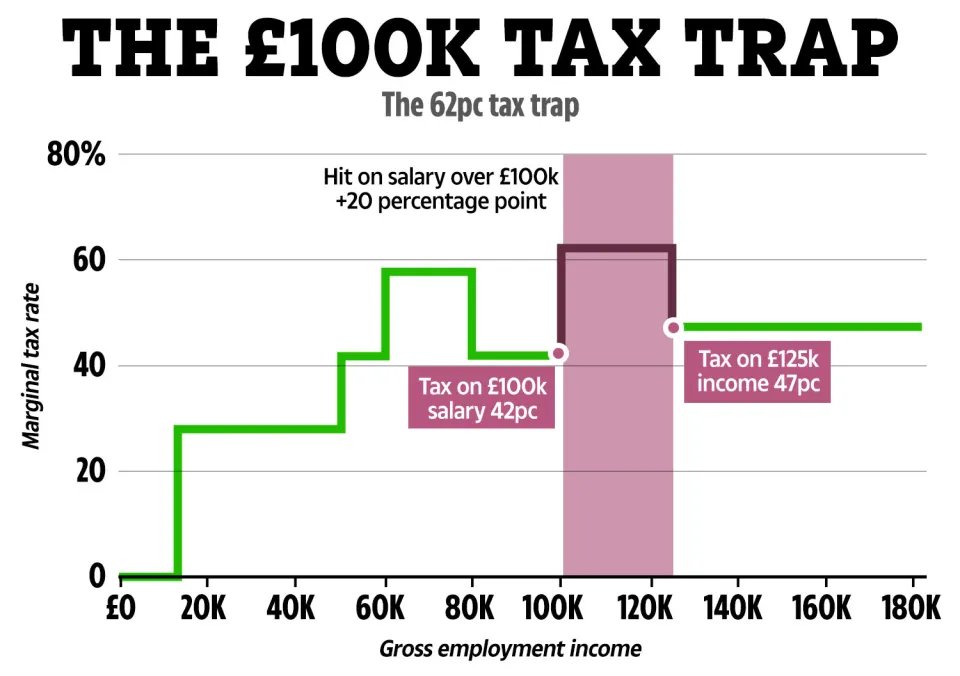
- Had taxable income over £100,000, or claimed Child Benefit while earning over £50,000 (High Income Child Benefit Charge).
- Received a notice from HMRC to file a return.
Even if below thresholds, register voluntarily to claim tax refunds or carry forward losses. New businesses should register as soon as possible.
For full eligibility details, see: GOV.UK: Check if you need to send a Self Assessment tax return.
Key Deadlines for Registration
- Register by 5 October 2025 if you started self-employment or had new untaxed income in the 2024/25 tax year (6 April 2024 to 5 April 2025). This gives you time to file your first return by 31 January 2026.
- Late registration incurs a £100 penalty, plus daily fines if your return is also late.
- If registering for other reasons (e.g., Capital Gains Tax), do so within 6 months of the tax year end.
Missing deadlines can lead to interest on unpaid tax. For more on penalties: GOV.UK: Self Assessment tax return penalties.
What Information Do You Need to Prepare?
Before starting, gather:
- Your full name, date of birth, and National Insurance number.
- Current address and contact details (email/phone).
- Details of your business or income source (start date, nature of business, estimated income).
- If a partnership, the partnership's UTR (if known).
- Bank account details (for refunds or payments).
- Proof of identity (e.g., passport, driving licence) if requested.
HMRC may verify your identity during the process.
Step-by-Step Guide to Registering for a UTR and Self Assessment
There are three main ways: online (recommended for speed), by post, or by phone (limited cases). Once registered, HMRC sends your UTR by post (up to 10 working days) or email if you provide one. You'll then set up online access to file returns.
Method 1: Register Online (Fastest and Most Common)
Online registration is secure and instant—HMRC processes it quickly, and you can track progress.
- Step 1: Visit the GOV.UK Registration Page
Go to GOV.UK: Register for Self Assessment. Click "Start now" under the self-employed or other relevant section. - Step 2: Confirm Your Eligibility
Answer questions about why you're registering (e.g., self-employed, partnership). If you're unsure, use the eligibility checker tool on the page. - Step 3: Create or Sign Into a Government Gateway Account
- If new, select "Create sign in details."
- Provide your email and set a password.
- HMRC sends a verification code to your email—enter it to proceed.
- For security, enable two-step verification (recommended).
- Step 4: Provide Your Personal Details
- Enter your name, date of birth, National Insurance number, address, and contact info.
- Specify your income source (e.g., self-employment details like business name, start date, and type—such as "taxi driver" or "freelance consultant").
- If registering for a partnership, include partnership details.
- Step 5: Verify Your Identity
HMRC may ask for additional verification using:- UK passport or driving licence details.
- P60, payslip, or tax credit info.
- Credit reference checks (soft search, no impact on credit score).
- Step 6: Submit and Await Confirmation
- Review and submit the form.
- You'll get an on-screen confirmation.
- HMRC sends your UTR by post (7-10 working days) or email if requested.
- Once you have your UTR, log back into Government Gateway to enrol for Self Assessment services.
For troubleshooting: GOV.UK: Problems registering for Self Assessment.
Method 2: Register by Post (For Those Without Online Access)
If online isn't possible (e.g., no email or internet), use the paper form.
- Step 1: Download or Request Form SA1
- Download from GOV.UK: Form SA1 - Register for Self Assessment.
- Or call HMRC at 0300 200 3310 (Monday to Friday, 8am to 6pm) to request a form by post.
- Step 2: Complete the Form
- Fill in Sections 1-4 with your personal details, NI number, address, and reason for registering.
- Provide business/income details in the relevant sections (e.g., self-employment start date, estimated turnover).
- Sign and date the form.
- Step 3: Gather Supporting Documents
- Include proof of identity if requested (photocopies of passport, etc.).
- No need to send originals unless specified.
- Step 4: Post the Form
- Send to: Self Assessment, HM Revenue and Customs, BX9 1AS.
- Use recorded delivery for tracking.
- Processing takes 2-4 weeks; HMRC will post your UTR.
Method 3: Register by Phone (Limited to Specific Cases)
Phone registration is mainly for those who can't use online/post, or for urgent queries.
- Step 1: Call the HMRC Helpline
Dial 0300 200 3310 (Self Assessment helpline; Monday to Friday, 8am to 6pm). Explain your situation and why you're registering. - Step 2: Provide Details Over the Phone
Give your personal info, NI number, and income details. The advisor may guide you through questions similar to the online form. - Step 3: Confirmation and Follow-Up
HMRC processes verbally but may require a follow-up form. UTR arrives by post in 10 days.
Phone lines can be busy—try early mornings. For more: GOV.UK: Contact HMRC for Self Assessment.
After Registration: What Happens Next?
- Receive Your UTR: Use it to log in and enrol for Self Assessment online.
- File Your First Return: By 31 January 2026 for 2024/25.
- Pay Any Tax: Use your UTR for payments.
- Keep Records: Maintain income/expense logs for 5-6 years.
Common Pitfalls and Tips
- Don't Delay: Register early to avoid rush-hour penalties.
- If You're Late: You can still register and file—explain reasons to potentially reduce fines.
- Overseas or Complex Cases: Additional forms may be needed (e.g., for non-residents).
- Business Structures: Limited companies need Corporation Tax registration separately (GOV.UK: Register for Corporation Tax).
- Help Available: Use HMRC's free webchat or helpline for queries.
For personalised support, such as reviewing your registration or preparing your first Self Assessment return, email us at [email protected] or fill out the contact form on our website. At Mayfair Tax Advisors, we're here to make the process straightforward.
Additional Resources and Links
Need Expert Advice?
Our team can help you navigate these changes and ensure your business remains compliant and tax-efficient.
Recent Articles

Moving to India Permanently While Keeping UK Property: A Complete UK–India Tax Planning Guide
January 28, 2026
HMRC Enquiries Into CIS Subcontractors: Why Inflated Expenses Trigger Investigations (And How to Protect Yourself)
January 25, 2026